


Punchbowl: Invites & eCards
4.85.98K Reviews
App Specs
- Version
- 4.2.4
- Updated On
- License
- Free
- Downloads
- 1,000,000+
- Developer
- Punchbowl
- Categories
- Lifestyle
- Platform
- Android
Screenshots
 Analysis by AppCompare
The real test for an invitation app is not whether it looks fun on the first day; it is whether it saves me enough effort to open it again for the next occasion. Punchbowl: Invites & eCards is a lifestyle app from Punchbowl built around digital invitations and eCards. Its appeal is easy to understand: I can put an event announcement together on my phone instead of designing a paper card or piecing together a message in a chat. Whether that becomes a lasting habit depends on how often I host, how much I care about presentation, and whether my guests will respond through the channels I use.
A quick payoff for the first event
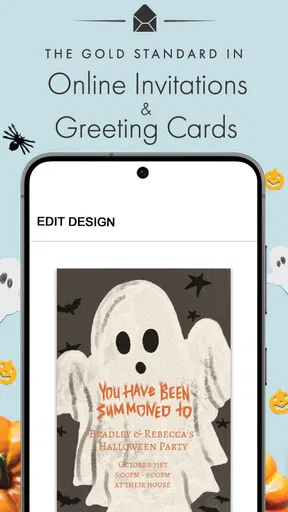
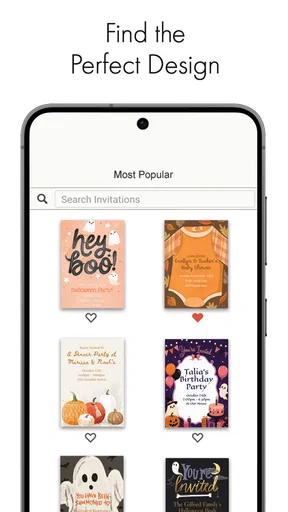
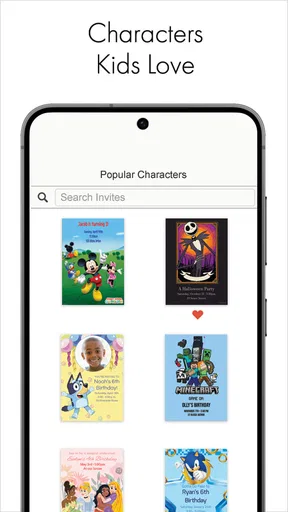
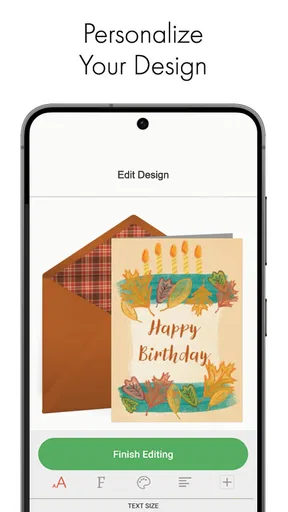
During the first week, the strongest draw is the chance to turn a basic announcement into something that feels deliberately made. The selection of designs gives me a starting point, while a personal photo and a few lines of text can make the result feel connected to the person or occasion. That is more polished than a plain group message, but less work than making and distributing a printed invitation.
I would use it for events where the invitation itself sets a tone: a child’s birthday, a casual dinner, a family gathering, or a shower. For a last-minute coffee plan, a chat message is probably quicker. For a more formal event where every printed detail matters, I would think carefully about whether a phone-made digital invite is the presentation I want. The value is not that every occasion needs an invitation; it is that some occasions benefit from one without turning preparation into a separate project.
A useful way to avoid spending too long browsing designs is to decide on the event’s mood before opening the template selection. Then add only the details guests need to act: what is happening, when and where, and how to respond. A decorative design cannot compensate for a missing time or unclear location. I find that keeping the message concise makes a digital invite easier to read on a phone, which is where many guests will see it.
Useful when the guest list needs follow-through
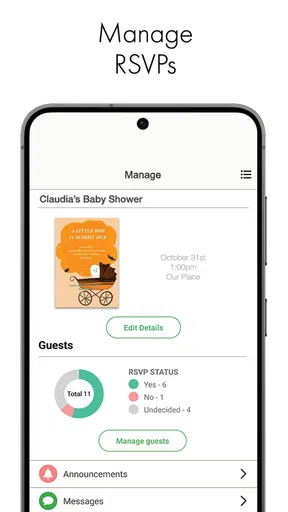
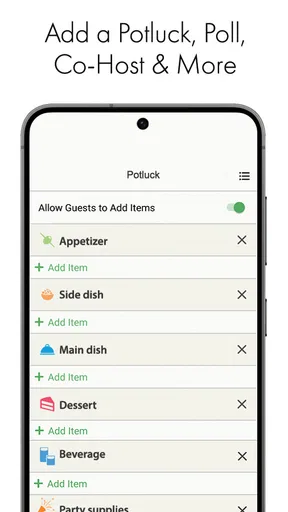
The practical case for an invitation tool becomes stronger once people need to reply. A chat thread can mix RSVPs with side conversations, questions, and unrelated updates; keeping track of the final headcount then means scrolling back and interpreting scattered messages. Punchbowl’s guest-list and RSVP tools are meant to keep that process more organized, with reminders and event-detail updates available alongside the invitation.
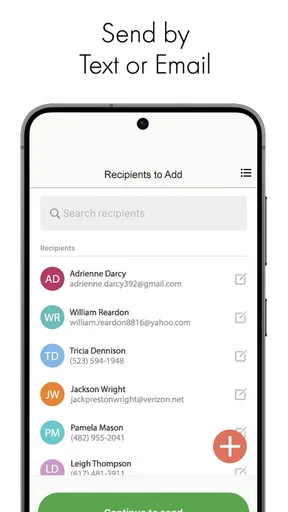
One realistic use is a family birthday where relatives are spread across different communication habits. I could send the invitation in a way that suits each guest, check responses in one place, and revise a detail if the plan changes. The important trade-off is that an organized invitation does not guarantee everyone will answer there. If some people reply by calling or messaging separately, I still need to keep the guest list current rather than assuming the app has captured every response.
For that reason, I would decide on a simple rule before sending: ask guests to respond through the invitation, and enter any replies that arrive elsewhere as soon as I receive them. That small bit of housekeeping matters more than repeatedly sending reminders. It helps keep the headcount trustworthy and reduces the chance of acting on an old response when food, seating, or supplies are involved.
Worth Reading Before You Choose

EA SPORTS FC Mobile 26 Is a Bigger Football Game, but It Takes Time

Flipboard Shows What News Apps Must Do Beyond the Feed

Switching to Android Auto Means Rethinking Your Driving Routine

Google Calendar Makes a Crowded Week Easier to Manage

Ludo King Makes the Most of the Minutes Between Plans

Baby Panda World Brings Quick Play to Modern Phones, but Its Game Library Feels Busy
Where it fits among familiar alternatives
Compared with paper invitations, a digital design is convenient to distribute and avoids printing and mailing. Compared with a plain text or social post, a designed invitation gives the event a clearer identity and can put its essential details in one place. The middle ground is the reason I would choose Punchbowl: it offers more ceremony than a quick message without requiring me to handle physical cards.
There are limits to that middle ground. A group chat is often better when the plan is informal and likely to change through conversation. A printed card may feel more appropriate when a keepsake or a formal presentation is part of the point. And if I only need to tell a few people where to meet, the extra step of choosing a design may not repay the effort. The app is at its best when the event is important enough to deserve a proper invitation but not so formal that digital delivery feels out of place.
The gift registry or wish-list option may also suit occasions such as a shower, where guests commonly ask what would be useful. I would treat it as helpful context, not a requirement: a registry can reduce guesswork, but it should not crowd out the invitation’s basic purpose or make a simple gathering feel transactional. It makes most sense when the host and guests already expect gift guidance.
What continued use asks of you
For month-to-month value, frequency matters. Someone who hosts birthdays, seasonal get-togethers, and family occasions may return to a dedicated invitation app more often than someone who plans one event a year. Punchbowl is free to download, has an average rating of 4.8 from around 15,000 ratings, and has been installed over a million times. Those figures suggest a substantial audience, but they do not settle whether its workflow suits my own circle.
The app is rated for Everyone, and version 4.2.4 runs on Android 5.0 and later. In-app purchases range from $5.99 to $84.99 per item, so I would check what a particular design or option costs before committing to it. The free entry point makes it reasonable to explore, but I would not assume every choice I may want is included at no charge. If I only need an occasional invite, a paid option may be harder to justify than it would be for a frequent host.
Maintenance is mostly social rather than technical: keep event information accurate, notice who has not replied, and reconcile answers that come through other channels. Before sending, I would check the date, start time, address, and response request as if I were a guest seeing the message for the first time. If plans change, updating the event is useful only if guests actually see the update, so I would still make sure important changes reach people who may miss app notifications or email.
When the novelty wears thin
Design browsing can be enjoyable for the first event and tiring for the fifth if I feel obliged to make every invite look different. I would rather choose a suitable style quickly than treat each occasion as a design challenge. The app’s value is in reducing the friction of inviting people, not in giving me another task to perfect.
There is also a practical fatigue point: people do not all manage invitations the same way. Some will respond promptly, some may overlook a digital invite, and others may answer through a separate conversation. That means I cannot hand over the whole job and forget it. For a small gathering, that extra coordination can make a normal message the more sensible choice; for a larger event, the centralized list may repay the effort.
In the Lifestyle category, Punchbowl is a focused tool rather than an all-purpose event-planning system. I would choose it for creating and sending an invitation, tracking responses, and sharing a gift list when appropriate. I would look elsewhere—or simply use a calendar invitation, text thread, or printed card—if the main need were detailed project planning, live group discussion, or a physical keepsake. Matching the tool to the job is what keeps the app from becoming clutter on my phone.
Seamless Invitation Experience
So, here's the scoop. Punchbowl isn't just your run-of-the-mill invitation app. It's like having a personal event planner in your pocket. The app lets you create stunning, personalized eCards and invitations for any occasion you can think of—birthdays, weddings, or even a casual get-together. And the best part? It's super intuitive.
When you first open the app, you're greeted with a wide array of design templates. Whether you're going for something chic and modern or fun and whimsical, Punchbowl has you covered. You can even add your own photos and text, making each invite uniquely yours. It's like unleashing your inner graphic designer without the stress.
User-Friendly Interface
Now, let's talk about the interface. It's slick, responsive, and incredibly user-friendly. Navigating through the app is a breeze, thanks to its clean design. Everything is organized neatly, so you're never more than a few taps away from creating your next masterpiece. Even if you're not the most tech-savvy person, you'll find yourself getting the hang of it in no time.
The app also allows you to manage your guest list efficiently. You can easily track RSVPs, send reminders, and even update event details if anything changes. It’s like having a digital assistant taking care of all the nitty-gritty details. Trust me, once you try it, you'll wonder how you ever managed without it.
Features That Stand Out
One of the standout features of Punchbowl is its ability to send invites via multiple platforms. Whether your guests prefer email, text, or even social media, you can send your invites through whichever means suits them best. It ensures that no one misses out, and you can reach everyone in your circle effortlessly.
Another cool feature is the option to add a gift registry or wish list. This is perfect if you're planning a bridal shower or a baby shower. It integrates seamlessly, so your guests can see exactly what you need and where to purchase it. No more awkward duplicate gifts or unwanted surprises.
Environmentally Friendly Choice
Choosing Punchbowl isn’t just about convenience; it’s also an eco-friendly choice. Say goodbye to paper waste and hello to digital invites that are not only sustainable but also incredibly stylish. It’s a win-win for both you and Mother Earth.
Plus, the app is constantly updating its library of designs to keep up with current trends. So whether you're planning a Halloween bash or a New Year’s Eve party, you can be sure your invites will be on point and up-to-date.
Conclusion: Is Punchbowl the Right Choice for You?
In a nutshell, if you're looking for a way to streamline your event planning process, Punchbowl: Invites & eCards is definitely worth checking out. It's more than just an invitation app; it's a powerful tool that makes organizing any event a breeze. With its beautiful designs, user-friendly interface, and thoughtful features, you'll be hosting your next big bash with style and ease.
So, why not give it a whirl? You might just find yourself becoming the go-to party planner among your friends, all thanks to the magic of Punchbowl. Happy inviting!
Pros
- User-friendly interface
- easy navigation.
- Wide variety of customizable templates.
- Allows RSVP tracking and reminders.
- Integrates smoothly with contacts.
- Offers free basic plan with many features.
Cons
- Limited designs in free version.
- Occasional ads in the free plan.
- Premium features can be pricey.
- Internet required for full functionality.
- Some templates are not mobile-friendly.
FAQs for Punchbowl: Invites & eCards
What features does Punchbowl offer for creating invitations and eCards?
Punchbowl provides a wide array of features for both invitations and eCards, including customizable templates, RSVP tracking, and the ability to add personal messages or photos. Users can choose from various themes suitable for birthdays, weddings, and other events, ensuring a tailored experience for every occasion.
Is Punchbowl free to use, or are there any subscription costs involved?
Punchbowl offers both free and premium options. While you can create and send basic invitations and eCards for free, subscribing to their premium service unlocks additional features such as ad-free experiences, exclusive designs, and advanced tracking tools. It’s advisable to explore both options to see which suits your needs.
Can I use Punchbowl on both Android and iOS devices?
Yes, Punchbowl is available for both Android and iOS users. The app is designed to deliver a seamless experience across platforms, allowing you to create, send, and manage invitations or eCards from your smartphone or tablet, ensuring accessibility no matter where you are.
How does Punchbowl ensure the security and privacy of my event details?
Punchbowl prioritizes user privacy and security by implementing robust measures. The platform uses encryption to protect your data and offers control over who can view or RSVP to your invitations. Users can feel confident that their personal information and event details remain private and secure.
Can I track RSVPs and manage guest lists using Punchbowl?
Absolutely, Punchbowl offers comprehensive RSVP tracking and guest list management features. You can easily see who has responded to your invitations, send reminders, and even update guest details as needed. This makes managing events straightforward and stress-free, ensuring you’re always organized.


